










“Which overdue customers also have open support cases?”
Handle sensitive accounts with full context.
FinanceSupport
Requires: Pilot / roadmap: requires verified availability of Accounting + support system connected


YOUR AI. YOUR COMPANY. CONNECTED.
Connect your business systems to supported AI tools.
fjordova · demo
Illustrative demo using synthetic data. Interface, tool calls and responses are simulated; this is not a recording of a live customer session.
Example questions for supported beta configurations. Available answers depend on the enabled tools and data.
All amounts are fictional, for the example company Bergstrand Kök & Bad AB. Cash assumptions: Assumed opening cash of 842,000 SEK, receipts of 877,000 SEK and payments of 706,000 SEK. All receipts arrive on the assumed dates; no additional payments or financing are included. This is an illustrative synthetic forecast — not actual bank data, and not a shipped forecast tool.
Your organisation’s approved AI tools
Claude and ChatGPT tested on a Fortnox test company. Gemini Business is verified to connect. Copilot, Grok and Mistral are not yet verified. Guides for other apps are not equivalent test evidence. Other MCP-compatible apps may work but are not verified.
Your business systems
Illustrative — accounting (Fortnox) is live today.
Product walkthrough
The same questions work in Claude and ChatGPT once Fortnox is connected through Fjordova.

 Synthetic example · Changes are proposals until confirmed
01 / 05 · Connect
Connect Fortnox yourself at Fjordova, then follow the connection steps for your AI in My account. Claude and ChatGPT tested on a Fortnox test company. Gemini Business is verified to connect. Copilot, Grok and Mistral are not yet verified. Guides for other apps are not equivalent test evidence. Other MCP-compatible apps may work but are not verified.
Illustrative walkthrough using synthetic data. Not a recording of a live session.
Selected AIClaude and ChatGPT tested on a Fortnox test company. Gemini Business is verified to connect. Copilot, Grok and Mistral are not yet verified. Guides for other apps are not equivalent test evidence. Other MCP-compatible apps may work but are not verified.
Fortnox · Available now
Additional integrations retain their Planned or Requested status.
Changes are proposals first: preview → confirmation under company settings → execution → result. The company must enable changes, and the AI connection needs write access. For Fortnox, My account offers AI app confirmation or own-page confirmation for irreversible or all changes. In AI app mode, Fjordova verifies the technical confirmation call, not what was said in the chat. Spiris changes always require your approval on Fjordova’s own page.
Finance lives in one system, orders in another, customers in a third. Fjordova gives supported AI tools governed access to the systems you connect — while your systems stay the source of truth.
How it works
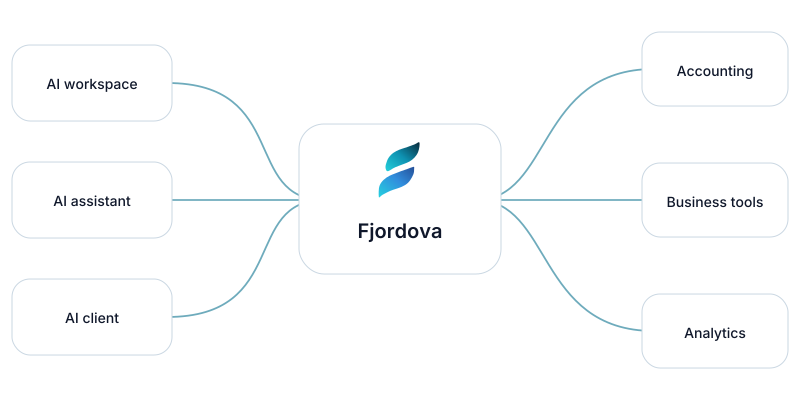
Choose your company, your AI environment and the systems to connect. You see exact permission scopes before anything happens.
Ask questions in the AI tool you already use. Answers draw on your connected systems, within the access you approved.
Add more systems and team access as adapters become available.
Integrations
Statuses are honest: we only call something available once it's verified.
Cross-system questions
Handle sensitive accounts with full context.
Requires: Pilot / roadmap: requires verified availability of Accounting + support system connected
See real margin, not just revenue.
Requires: Pilot / roadmap: requires verified availability of Store + accounting connected
Move from numbers to explanations.
Requires: Pilot / roadmap: requires verified availability of BI + ERP or accounting connected
Spot cash risk before it lands.
Requires: Pilot / roadmap: requires verified availability of Project tool + accounting connected
Align sales and finance in one answer.
Requires: Pilot / roadmap: requires verified availability of CRM + accounting connected
Connect Fortnox or Spiris yourself in minutes. Claude and ChatGPT are tested on a Fortnox test company.
Not tied to one AI vendor or one system.
Scoped permissions and explicit approvals.
Additional adapters and team access are proposed.
Choose your route
Manage the companies you represent with access kept separate for each company.
For accounting firmsCommerce teams: store, payments and accounting are roadmap examples; planned adapters are not generally available.
A governed connection
Fjordova is designed to retrieve the information needed from your connected business systems and pass it to your chosen AI — without building a permanent copy of your accounting data.
Original business records remain in the systems you already use.
The connection is governed by the access granted to it.
Preview → confirmation under company settings → execution → result. Changes require company enablement and AI write access. Choose AI app confirmation or own-page confirmation for irreversible or all changes in My account.
Illustrative data flow
Your chosen AI
ExampleYour business systems
Original records remain at the source.
Your selected AI receives the information under your separate agreement with that provider.
Connection and security records
The audit log is content-free; temporary encrypted proposals and results are not and can contain sensitive business and personal data. They are not a separate accounting archive.
You ask a question in your AI tool.
Reads pass through working memory and to your selected AI; there is no separate accounting, payroll or document archive. Change input, previews and execution results are temporarily stored encrypted and may contain financial, payroll, document and sensitive personal data. Code can decrypt them to perform the task. Encryption is not anonymisation or proof that technical access is impossible. Company and identity records can include encrypted email and company details.
Changes are proposals first: preview → confirmation under company settings → execution → result. The company must enable changes, and the AI connection needs write access. For Fortnox, My account offers AI app confirmation or own-page confirmation for irreversible or all changes. In AI app mode, Fjordova verifies the technical confirmation call, not what was said in the chat. Spiris changes always require your approval on Fjordova’s own page.
The service terms, privacy policy and data processing agreement (in Swedish; including subprocessors, retention periods and incident notification) are available at: villkor · integritetspolicy · personuppgiftsbitradesavtal
Pricing
Fjordova is free during launch: 0 SEK per personal user account, no card needed. Fortnox licences and your AI subscription are not included. Any future price is announced at least 30 days in advance and requires explicit approval by an authorised buyer; continued use is never consent.
Everyone during launch
0 SEK per personal user account
No card. Fortnox licences and AI subscriptions excluded. Future pricing requires 30-day notice and explicit authorised buyer approval.
Small businesses
Proposed
Accounting firms
Proposed
Mid-market
Proposed
Enterprise & public sector
Proposed
System vendors
Proposed

Connect your company yourself today, or leave your details and we help you get set up. The form creates no account; connect at Fjordova to start.
Prefer email? support@fjordova.com